お手続きは次の2つだけで、1〜2分で終わります。eBayの画面は英語ですので、画像でご案内します。
手順 1 リンクを開く
お送りしたリンクを開いてください。eBay公式の許可画面(ebay.com)が表示されます。
手順 2 確認して、「Agree and Continue」を押す
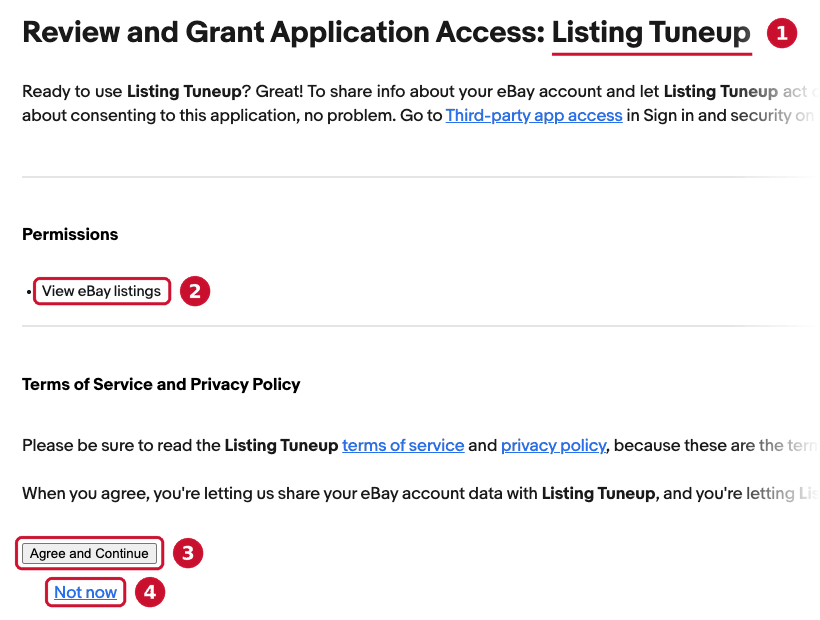
- アプリの名前が「Listing Tuneup」になっていること
- 「Permissions」(許可の内容)が「View eBay listings」(出品の閲覧)の1つだけであること
- 確認できたら、「Agree and Continue」を押してください。
- 取りやめる場合は「Not now」を押してください。その場合、出品情報は一切読み取りません。
これで完了です
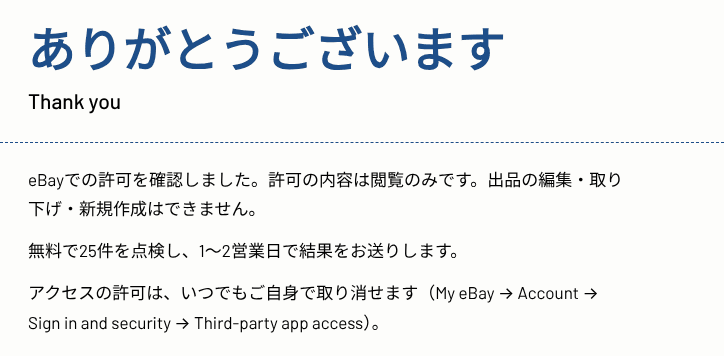
「ありがとうございます」というページが表示されれば、お手続きは完了です。無料で25件を点検し、1〜2営業日で結果をお送りします。
補足
- 許可の内容は閲覧のみです。出品の編集・取り下げ・新規作成はできません。eBayのパスワードを当方が知ることはありません。
- 画面には、eBayの定型文として「act on your behalf」(お客様に代わって操作する、という意味)という表現がありますが、今回の許可でできるのは閲覧のみです。
- eBayにログインしていない場合は、先にeBayのログイン画面が表示されます。
- アクセスの許可は、いつでもご自身で取り消せます(My eBay → Account → Sign in and security → Third-party app access)。一覧にある「Listing Tuneup」の許可を取り消してください。
- 「申し訳ございません」というページが表示された場合や、ご不明な点がある場合は、luke@listingtuneup.com までご連絡ください。出品には一切変更を加えていません。
In English
There are only two things to do, and it takes a minute or two. The numbers are the red numbers in the first picture above.
Step 1. Open the link. Open the link I sent you. eBay's own permission screen (on ebay.com) appears.
Step 2. Check, then click "Agree and Continue". (1) The application's name is "Listing Tuneup". (2) Under "Permissions" there is one line only, "View eBay listings". (3) When you have checked, click "Agree and Continue". (4) To stop, click "Not now"; nothing is read in that case.
That is all. When the page that says "ありがとうございます" (thank you) appears, you are done. I check 25 listings for free and send you the result within 1–2 business days.
Notes.
- The permission is view-only. I cannot edit, end or create listings, and I never see your eBay password.
- eBay's standard text on the screen says an application may "act on your behalf"; with this permission, all it can do is view.
- If you are not signed in to eBay, eBay's sign-in screen comes first.
- You can remove the access yourself at any time: My eBay → Account → Sign in and security → Third-party app access. Find "Listing Tuneup" in the list and remove it.
- If you see a page that says "申し訳ございません" (sorry), or anything is unclear, e-mail luke@listingtuneup.com. Nothing in your listings was changed.